How Should You Format a Professional Email?
Format professional emails with clear subject line stating purpose, formal greeting using recipient's title and last name, brief opening paragraph establishing context, body paragraphs (2-3 maximum) organized with clear purpose and specific request, polite closing with next steps or call to action, formal sign off (Best regards, Sincerely), and complete signature block including full name, title/year, institution, phone number, and LinkedIn profile if relevant.
Professional Email Structure Template
Subject Line: [Clear, specific description in 4-8 words]
Greeting: Dear [Title] [Last Name],
Opening (1 to 2 sentences): [Introduce yourself briefly if needed + establish context]
Body (2 to 4 sentences): [State your purpose clearly + provide necessary context + make a specific request]
Closing (1 sentence): [Thank recipient + suggest next steps]
Sign off: [Formal closing], [Your Full Name] [Your Title/Year e.g., "Junior, Business Administration"] [University Name] [Phone Number] [LinkedIn Profile URL: optional]
Formatting Best Practices
Subject line rules
Paragraph structure
Font and styling
Length guidelines
Emails under 125 words receive 50% higher response rates than those over 200 words, demonstrating that conciseness dramatically improves outcomes. |
What Tone and Language Should You Use in Professional Emails?
Use professional formal tone, balancing respect with confidence, avoiding slang, text-speak, emojis, and excessive exclamation points, employing complete sentences with proper grammar and punctuation, being direct and clear rather than vague or rambling, showing politeness through word choice ("Would you be available," not "I need you to"), and proofreading thoroughly before sending. Research shows 73% of employers judge candidate professionalism based on email communication quality.
1. Language Do's and Don'ts
Avoid these casual phrases
Use these professional alternatives
|
2. Striking the Right Tone
Too casual (avoid): "Hey Prof,
Can u send me the notes from last week? I wasnt there lol. Thanks!"
Too formal (outdated): "To Whom It May Concern:
I am writing to humbly request that you might find it within your capacity to provide me with the lecture materials from the previous week's session, as I found myself unable to attend due to unforeseen circumstances.
I remain your most obedient servant, [Name]"
Just right (professional but natural): "Dear Professor Martinez,
I hope you're doing well. I missed class last Tuesday due to illness and wanted to request the lecture notes or slides if possible. I've already reviewed the syllabus and textbook chapter, but I'd like to ensure I haven't missed important points from your lecture.
Would you be able to share the materials, or should I arrange to borrow notes from a classmate?
Thank you for your understanding.
Best regards, Sarah Chen Sophomore, Biology University of California."
3. Proofreading Checklist
Before sending any professional email
- Spell check (don't rely solely on autocorrect)
- Grammar check (read aloud to catch errors)
- Recipient name spelled correctly
- Attachments included if referenced
- Subject line completed
- Tone appropriate for the audience
- Clear purpose and request stated
- No all caps or excessive punctuation
- Signature block complete
73% of employers report immediately dismissing candidates who send emails with spelling or grammar errors, making proofreading absolutely essential for professional opportunities.
What Are Common Email Templates for Students?
Common email templates students need include professor office hours requests, recommendation letter requests sent 4 to 6 weeks before deadlines, internship application follow-ups sent 1 to 2 weeks after submission, thank-you emails after interviews sent within 24 hours, networking introduction emails connecting through mutual contacts, absence notifications sent as early as possible, and assignment extension requests explaining circumstances with proposed solution.
Template 1: Requesting Professor's Office Hours
Subject: ECON 301 Office Hours Question about Problem Set 3
Dear Professor Williams,
I hope you're doing well. I'm a student in your ECON 301 Microeconomics class (Tuesday/Thursday 10am section), and I'm working through Problem Set 3.
I'm struggling with the elasticity calculations in questions 4 to 6 and would appreciate your guidance. Would you have 15 to 20 minutes available during office hours this week to discuss my approach?
I've attempted the problems and can show my work, but I'd like to understand where I'm going wrong before the assignment deadline on Friday.
Thank you for your time and assistance.
Best regards, Michael Torres Junior, Economics University of Michigan mtorres@umich.edu
Template 2: Requesting Recommendation Letter
Subject: Recommendation Letter Request for Graduate School Applications
Dear Dr. Anderson,
I hope this email finds you well. I'm currently preparing my applications for graduate programs in public policy and wanted to ask if you would be willing to write a letter of recommendation for me.
I've taken two courses with you (POLI 250 and POLI 430) and worked as a research assistant on your voting behavior project last spring. I believe you can speak to my analytical skills, research capabilities, and genuine interest in policy analysis.
The first application deadline is January 15th, giving approximately six weeks for letter completion. I'm happy to provide my resume, personal statement draft, and list of accomplishments from your courses to help you write the letter.
Please let me know if you're able to write a strong recommendation. I completely understand if your schedule doesn't permit this commitment.
Thank you for considering my request.
Best regards, Jennifer Kim Senior, Political Science Boston University (617) 555-0123 jennifer.kim@bu.edu
Template 3: Internship Application Follow Up
Subject: Following Up: Marketing Intern Application: David Chen
Dear Ms. Rodriguez,
I hope you're doing well. I'm following up on my application for the Marketing Intern position I submitted on October 15th. I remain very interested in the opportunity to contribute to your social media campaigns and content strategy.
Since applying, I've completed a Google Analytics certification and launched a successful Instagram campaign for a local nonprofit, increasing their followers by 340% over two months. These experiences have further prepared me for the internship.
I'd welcome the opportunity to discuss my qualifications and learn more about the position. Would you have time for a brief phone conversation in the coming weeks?
Thank you for considering my application.
Best regards, David Chen Junior, Marketing San Diego State University (858) 555-0198 linkedin.com/in/davidchen
Template 4: Thank You Email After Interview
Subject: Thank You Marketing Coordinator Interview
Dear Mr. Johnson,
Thank you for taking the time to interview me yesterday for the Marketing Coordinator position. I enjoyed learning more about the digital campaign strategies you're implementing and the collaborative team environment.
Our discussion about data-driven content optimization particularly resonated with me, and I'm excited about the possibility of applying my Google Analytics skills to help achieve your Q2 engagement goals.
I appreciate your consideration and look forward to hearing about next steps in the process.
Best regards, Amanda Foster Recent Graduate, Marketing Northwestern University (312) 555-0176 afoster@email.com
Template 5: Networking Introduction Email
Subject: Introduction from Sarah Martinez at Tech Conference
Dear Ms. Thompson,
My name is Alex Rivera, and Sarah Martinez suggested I reach out to you. I met Sarah at the Women in Tech Conference last month, and she mentioned that your career path in product management aligns closely with my interests.
I'm currently a junior studying computer science at Cornell and exploring product management opportunities after graduation. I'd love to learn about your experience transitioning from engineering to PM roles at Microsoft.
Would you have 15 to 20 minutes for a brief phone or video conversation in the coming weeks? I'm happy to work around your schedule and would greatly appreciate any insights you're willing to share.
Thank you for considering my request.
Best regards, Alex Rivera Junior, Computer Science Cornell University (607) 555-0142 alex.rivera@cornell.edu
| When managing multiple professional email communications during busy academic periods, consider using a professional essay writing service for routine coursework, allowing focus on crafting thoughtful networking emails, internship applications, and professor communications that directly impact academic and career opportunities. |
What Email Mistakes Hurt Your Professional Image?
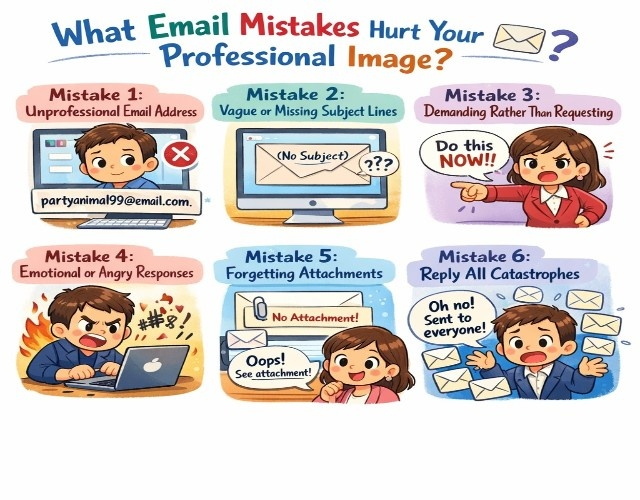
Email mistakes hurting professional image include using unprofessional email addresses (partygirl2024@email.com), sending from mobile without signature blocks or with "Sent from iPhone" taglines, replying all when intended for single recipient, forgetting attachments referenced in email body, using casual greetings like "Hey" or "Yo" with professors or employers, failing to proofread creating embarrassing typos, and sending emotional responses without 24 hour cooling period.
Critical Mistakes to Avoid
Mistake 1: Unprofessional Email Address
Your email address is the first thing recipients see and immediately shapes impressions.
Unprofessional (never use)
- partyguy2003@email.com
- sexykitten94@email.com
- ihatemondays@email.com
- 420blazeit@email.com
- cutiepie.love@email.com
Professional (always use)
- firstname.lastname@email.com
- firstinitiallastname@email.com
- firstname.middleinitial.lastname@email.com
- f.lastname@email.com
Create a professional Gmail account specifically for career and academic communications if your current email is unprofessional. Never use unprofessional addresses for job applications, professor emails, or networking.
Mistake 2: Vague or Missing Subject Lines
Subject lines determine whether emails get opened or ignored among 50 to 100 daily messages.
Bad subject lines
- "Question"
- "Help"
- "Hey"
- "Quick question"
- [blank/no subject]
Good subject lines
- "BIOL 201
- Lab Report Submission Question"
- "Marketing Internship Application: Sarah Chen"
- "Following Up: Career Advice Request"
- "Recommendation Letter Materials
- Deadline Jan 15."
Mistake 3: Demanding Rather Than Requesting
Tone matters enormously in written communication, lacking vocal cues.
Demanding tone (avoid)
- "I need you to send me the notes from Tuesday."
- "You have to write me a recommendation letter."
- "Send me the information ASAP."
- "I require an extension on the assignment."
Polite requesting tone (use)
- "Would you be able to share the notes from Tuesday?"
- "Would you be willing to write a recommendation letter for me?"
- "When might you have time to send the information?"
- "Would it be possible to request a brief extension on the assignment?"
Mistake 4: Emotional or Angry Responses
Never send emails when emotional, frustrated, or angry. Implement a 24 hour cooling period for sensitive communications.
When to wait before sending
- Disagreeing with the grade or feedback
- Responding to rejection or criticism
- Addressing perceived unfair treatment
- Expressing frustration about miscommunication
- Reacting to disappointing news
Draft response, save as a draft, and review 24 hours later with a fresh perspective. Most people significantly soften their tone and improve professionalism after a cooling period.
Mistake 5: Forgetting Attachments
Mentioning attachments but forgetting to attach is a common, embarrassing error.
Prevention strategies
- Attach files FIRST before writing the email body
- Use keyword triggers ("attached," "included") to remind yourself
- Enable Gmail or Outlook "attachment reminder" features
- Review email one final time, specifically checking for attachments
- Keep attachments under 10MB (use Google Drive or Dropbox for larger files)
Mistake 6: Reply All Catastrophes
Using "Reply All" when intending to reply only to the sender can share private comments with the entire recipient list.
Before hitting Reply All, ask
- Do all recipients need this information?
- Does my response contain anything confidential or personal?
- Am I sharing criticism or complaints entire group shouldn't see?
- Is this adding value to everyone or cluttering inboxes?
Default to "Reply" for a single recipient. Only use "Reply All" when your response genuinely benefits the entire group.
How Long Should You Wait for Email Responses?
Wait 2 to 3 business days before following up on professional emails to professors or employers, allowing time for busy schedules and full inboxes. Research shows professionals receive 50 to 100+ emails daily, with response times averaging 48 to 72 hours for non urgent messages. Follow up after one week maximum if response time-sensitive, using polite language acknowledging their busy schedule rather than demanding immediate attention.
Response Time Expectations
Appropriate waiting periods before follow up
- Professors: 2 to 3 business days (they receive 50 to 100+ emails daily)
- Employers/Recruiters: 5 to 7 business days (higher volumes, multiple candidates)
- Career Services: 3 to 5 business days (busy during peak periods)
- Alumni/Networking: 1 week (unpaid favor, busy professionals)
- Administrative Staff: 2 to 3 business days (process-oriented responses)
When to send an immediate follow up
- Emergency situations affecting the ability to attend class or meet a deadline
- Time sensitive opportunities with imminent deadlines
- Correcting information in previous email (wrong attachment, critical error)
Follow Up Email Template
Subject: Following Up: [Original Subject Line]
Dear [Name],
I hope you're doing well. I'm following up on my email from [date] regarding [topic]. I understand you're very busy, but wanted to check if you had a chance to review my request.
[Optional: Restate key question or request in 1 sentence]
If this isn't a good time, I completely understand and am happy to follow up at a later date.
Thank you for your time and consideration.
Best regards, [Your Name]
Follow up best practices
|
When Should You Email Versus Use Other Communication Methods?
Use email for formal requests requiring documentation (recommendation letters, academic accommodations, grade disputes), non-urgent questions allowing thoughtful responses, professional networking introductions, job applications and follow-ups, and situations requiring paper trail. Use office hours for complex conceptual questions needing back-and-forth dialogue, Slack or Teams for quick operational questions in established professional relationships, phone calls for time-sensitive urgent matters, and in-person meetings for sensitive career discussions or networking when possible.
Communication Channel Selection Guide
Choose EMAIL when
- Formal request requiring documentation
- Non-urgent question allowing 24 to 48 hour response time
- Introducing yourself to a new professional contact
- Following up on applications or interviews
- Sharing documents or detailed information
- Creating a paper trail for official communications
- Recipient's preferred method (professors, employers)
Choose OFFICE HOURS when
- Complex conceptual questions needing clarification
- Assignment requires back and forth discussion
- Building a relationship with the professor is important
- Visual explanation or whiteboard helpful
- Multiple related questions to discuss
- Sensitive academic matters (grades, accommodations)
Choose PHONE CALL when
- Time sensitive urgent matter
- Quick yes/no question for established contact
- Following up after multiple unreturned emails
- Interview scheduling or coordination
- Networking conversation (after email introduction)
Choose IN PERSON MEETING when
- Career advice or mentorship discussion
- Networking at events or conferences
- Sensitive personal or academic matters
- Final round job interviews
- Building a stronger relationship after email introduction
Choose SLACK/TEAMS when
- Quick operational question in work/internship context
- Already established communication channel
- Time sensitive but not emergency
- Informal team collaboration
- Following up on the previous conversation
Email remains the professional default for first contact, formal requests, and situations requiring documentation. Only shift to other channels after establishing a relationship or when urgency requires immediate response.
Key Takeaways
Master professional email etiquette through these evidence-based strategies:
Format emails professionally with clear subject lines stating purpose, formal greetings using the recipient's title and last name, concise body under 200 words with single clear request, proper paragraph breaks with white space, and complete signature blocks including full name, title, institution, and contact information. Professionally formatted emails receive 44% higher response rates.
Use a formal, respectful tone, avoiding slang, text speak, emojis, and excessive punctuation, while employing complete sentences with proper grammar and spelling. Research shows 73% of employers judge professionalism based on email quality, with spelling errors immediately disqualifying candidates from consideration.
Proofread thoroughly before sending, checking spelling, grammar, recipient name accuracy, attachment inclusion, subject line completion, tone appropriateness, and clear purpose statement. Emails under 125 words receive 50% higher response rates than those over 200 words, demonstrating that conciseness improves outcomes.
Wait 2 to 3 business days before following up on professor emails and 5 to 7 days for employer communications, acknowledging busy schedules receiving 50 to 100+ daily emails. Use polite follow up language referencing the original email date and respectfully restating the key request without demanding immediate attention.
Use appropriate communication channels, selecting email for formal documented requests, office hours for complex conceptual discussions, phone calls for time-sensitive matters, and in-person meetings for sensitive career conversations. Email remains the professional default for first contact and formal communications.
Professional email competency directly impacts academic success, internship opportunities, and career advancement. The 44% higher response rate for well formatted emails and immediate disqualification for spelling errors demonstrates the concrete importance of email etiquette mastery, justifying careful attention to formatting, tone, and proofreading standards.
When managing professional email communications alongside demanding coursework during busy academic periods, consider using a trusted essay writing service for routine assignments, allowing focus on crafting thoughtful networking emails, professor communications, and internship applications that directly impact academic performance and career opportunities shaping your professional future.