What Makes a Strong LinkedIn Profile Photo and Banner?
Your profile photo is the single most important visual element determining whether people engage with your profile. Profiles with photos receive 21 times more profile views and 9 times more connection requests than those without.
1. Professional Profile Photo Requirements
Use a high quality headshot with a professional appearance, not a casual selfie, group photo, or graduation picture where others are cropped out. Your photo should show:
- Head and shoulders composition filling 60% of the frame
- Neutral or professional background (solid color, blurred office, or outdoor setting)
- Professional attire matching your industry (business for most fields, business casual for tech/creative)
- Good lighting with your face clearly visible
- Genuine smile and direct eye contact with the camera
- A recent photo reflecting your current appearance
Research shows profiles with professional-looking photos receive 40% more InMail messages from recruiters than those with casual photos.
Your photo doesn't need expensive photography; a smartphone works fine with good lighting and proper framing. Ask a friend to take several options and choose the most professional.
Avoid common mistakes: sunglasses, hats, filters, party photos, extreme close ups, or photos where you're barely visible. Remember, recruiters will compare your LinkedIn photo to your appearance at the interview, so use authentic, professional photos that accurately represent you.
2. Custom Banner Image Strategy
The banner space (1584 x 396 pixels) behind your profile photo is prime real estate most students waste with default blue graphics. Custom banners increase profile memorability and communicate professionalism.
Effective banner options:
- University campus photo showing school pride
- Industry related imagery (technology, business, healthcare themes)
- Professional design with your tagline or career focus
- Personal brand statement combining visuals and text
Free tools like Canva offer LinkedIn banner templates. Keep designs clean and professional, avoid clutter or overly creative designs unless you're in a design/creative field. Students with custom banners report 25% more profile engagement than those using defaults.
For students managing LinkedIn optimization while facing assignment deadlines, many strategically use an essay writing service for specific papers, freeing up time for profile building that drives career opportunities.
How Do You Write a Compelling LinkedIn Headline?
| Aspect | Weak Headline | Strong Headline |
|---|---|---|
| Focus | Job title only | Value + role |
| Clarity | Vague | Specific |
| Keywords | Missing | Industry keywords included |
| Impact | Forgettable | Memorable & searchable |
Your headline appears in every search result and connection request; it's your 120 character elevator pitch, determining whether recruiters click to see more. The default "Student at [University]" wastes this valuable space.
1. Headline Formula That Attracts Recruiters
Strong headlines follow this structure: [Your Major/Focus] | [Key Skills] | [Career Goal] | [University]
Examples:
- "Computer Science Major | Python, Java, Web Development | Seeking SWE Internships | UCLA '26"
- "Marketing Student | Social Media Strategy, Content Creation | Future Brand Manager | NYU"
- "Mechanical Engineering | CAD, SolidWorks, Robotics | Seeking Product Design Roles | MIT '25"
This format is keyword rich (helping recruiters find you), specific (providing clear direction), and action oriented (stating what you're seeking).
Research shows that headlines containing relevant keywords receive 3-4 times as many recruiter searches as generic student titles.
2. Keyword Research for Your Headline
Use keywords from job descriptions you're targeting. If you're seeking marketing internships, analyze 5-10 relevant job postings and identify the most common skills and qualifications. Incorporate these exact terms into your headline; LinkedIn's algorithm matches search terms to profile keywords.
Common high value keywords by field:
- Tech: Full stack, front end, data science, machine learning, cloud computing
- Business: Financial analysis, market research, consulting, operations
- Engineering: CAD/CAM, FEA, product design, systems engineering
- Communications: Digital marketing, content strategy, public relations
Students using keyword optimized headlines appear in 50-60% more recruiter searches than those with vague titles. The algorithm favors exact keyword matches, so using industry standard terminology matters significantly.
3. Update Headlines as You Progress
Your headline should evolve as you gain experience and clarify goals. Freshman year might emphasize "Exploring careers in..." but junior/senior year should specify "Seeking [specific role]." Active job seekers should include "Open to opportunities" or "Seeking [season] internships" to signal availability.
Update headlines whenever you:
- Complete significant projects or internships
- Develop new in demand skills
- Clarify your career direction
- Begin active job searching
Profiles with recently updated headlines get priority in LinkedIn's algorithm. Regular updates signal active engagement, boosting your profile's visibility in search results.
What Should You Include in Your Experience Section?
The Experience section builds your credibility by detailing your accomplishments, not just listing job titles and duties. This section determines whether recruiters message you or move to the next candidate.
1. Treat Every Experience as Valuable
Don't only list prestigious internships; include relevant coursework projects, campus involvement, volunteer work, part time jobs, and freelance work. Students worry about "not having enough experience," but transferable skills exist everywhere if you frame them correctly.
A retail job demonstrates customer service, problem solving, and teamwork. Leading a student organization demonstrates project management and leadership skills. Class projects display technical skills and collaboration. Frame each experience, showing how it developed professional capabilities.
Research shows students listing 3-4 diverse experiences with detailed descriptions receive 40% more profile views than those with 1-2 minimal entries.
Quantity with quality beats sparse profiles, suggesting inactivity.
2. Use the PAR Format for Descriptions
Structure experience descriptions using Problem Action Result:
Weak: "Responsible for social media management."
Strong: "Increased Instagram engagement 45% over 6 months by implementing a content calendar with user generated content campaigns, resulting in 2,000+ new followers and 30% higher post reach."
The strong version shows:
- Problem/Context: Social media needed growth
- Action: Specific strategies you implemented
- Result: Quantifiable outcomes
Include metrics whenever possible: percentages, dollar amounts, time saved, people impacted, and rankings achieved. Numbers make achievements concrete and memorable. Students using quantified results receive 35% more recruiter messages than those with vague descriptions.
3. Incorporate Keywords Naturally
Recruiters search LinkedIn using specific technical skills and tools. Mention relevant software, methodologies, and competencies throughout your experience descriptions. If you used Excel, Python, Adobe Suite, or specific frameworks, name them explicitly.
Example keyword integration: "Analyzed customer data using SQL and Python to identify purchasing patterns, creating Tableau dashboards visualizing trends that informed marketing strategy, resulting in 20% increased conversion rates."
This description naturally includes five searchable keywords while telling a compelling achievement story. The more relevant keywords your profile contains in context, the higher you rank in recruiter searches.
4. Keep Descriptions Scannable
Use bullet points for readability; recruiters skim profiles quickly. Each experience should have 2-4 bullet points hitting key achievements. Front load important information in the first 2-3 lines visible before the "...see more" truncation.
Start bullets with strong action verbs: Developed, Analyzed, Led, Designed, Implemented, Optimized, Created, Managed. Avoid passive voice and weak verbs like "Helped with" or "Assisted in."
For students managing LinkedIn optimization alongside course assignments and projects, many use a professional essay writing service for specific papers, creating bandwidth for the detailed experience descriptions that attract recruiters.
How Do You Optimize Skills, Endorsements, and Recommendations?
The Skills section is crucial for LinkedIn's search algorithm; recruiters filter candidates by specific skills, and profiles lacking relevant skills don't appear in results, regardless of experience quality.
1. Add 50 Relevant Skills (Maximum Allowed)
LinkedIn allows 50 skills; use all 50 slots with industry relevant competencies. More skills mean more search keywords connecting you to opportunities. Prioritize:
- Technical/hard skills specific to your field
- Software and tools commonly used in target roles
- Methodologies like Agile, Six Sigma, and Design Thinking
- Soft skills like Leadership, Communication, and Project Management
- Industry specific competencies
Order matters: your top 3 skills should be displayed prominently and should be your strongest, most relevant competencies. Recruiters often endorse your top skills, and high endorsement counts signal credibility.
Research job descriptions in your target field and add every skill you possess that appears frequently. Students with 40-50 skills listed receive 70% more profile views than those with 10-20.
2. Get Strategic Endorsements
Endorsements validate your skills; profiles with 5+ endorsements per skill rank higher in searches. Ask classmates, professors, project teammates, and former supervisors to endorse your top skills.
Make it easy: "I'd appreciate it if you could endorse me for Python, Data Analysis, and Project Management since we worked together on [specific project]." Specific requests get higher response rates than generic "please endorse me."
Reciprocate endorsements, LinkedIn's mutual engagement algorithms favor active profiles. When you endorse others, many reciprocate, building your credibility organically.
3. Request Recommendations from Supervisors and Professors
Recommendations are powerful social proof; written testimonials from credible sources significantly strengthen a profile. Aim for 2-3 strong recommendations from:
- Internship supervisors highlighting specific contributions
- Professors discussing academic work and character
- Project leaders describing your team's contributions
- Campus organization advisors noting leadership
Make recommendation requests specific: "Would you be willing to write a brief LinkedIn recommendation highlighting my work on [specific project]? I'd especially appreciate it if you could mention my [specific skill] and [achievement]."
Provide writers with bullet points outlining what you'd like emphasized. This makes their job easier and ensures recommendations align with your strategic goals. Students with 3+ recommendations receive 40% more recruiter InMail messages than those without.
What Engagement Strategies Increase Your Visibility?
LinkedIn rewards active users with higher algorithmic visibility. Passive profiles gathering dust rank lower in searches than regularly active profiles, even with identical qualifications.
1. Build a Network of 50+ Connections
LinkedIn's algorithm treats profiles differently based on connection count. Reaching 50 connections triggers several platform benefits, including higher search visibility and access to second degree network opportunities.
Connect strategically with:
- Classmates and peers in your major/career interests
- Alumni from your university working in target fields
- Professors and academic advisors
- Colleagues from internships and jobs
- Professional contacts from events and career fairs
- Industry professionals after meaningful interactions
Always personalize connection requests: "Hi [Name], I enjoyed your presentation at [Event] about [Topic]. I'm a [Major] student interested in [Field] and would value connecting with you." Generic requests get ignored, and personalization shows genuine interest.
Aim for 100-500 connections, enough to access broad networks without appearing to add everyone indiscriminately. Students with 150+ connections receive 5 times as many profile views as those with fewer than 50.
2. Engage with Industry Content Regularly
Comment on, like, and share relevant industry posts to increase your visibility and demonstrate engagement with your field. LinkedIn's algorithm prioritizes active users in search results and suggests engaged profiles to recruiters.
Spend 10-15 minutes weekly:
- Following companies and thought leaders in your industry
- Commenting thoughtfully on industry posts (2-3 sentences minimum)
- Sharing articles relevant to your field with brief commentary
- Posting about your projects, learning, or professional insights
Meaningful engagement beats passive scrolling. One substantive comment weekly on industry content keeps your profile active in your network's feeds.
Research shows that students who engage weekly receive 30-40% more profile views and recruiter contacts.
3. Post Content Showcasing Your Work
Share project updates, article reflections, or insights from courses demonstrating your growing expertise. Posts don't need to be groundbreaking; authentic professional development content resonates.
Strong post ideas:
- "Just completed a [project] using [tools], here's what I learned..."
- "Interesting article on [industry trend], my take is [thoughtful perspective]..."
- "Excited to have finished [course/certification], key takeaways include..."
Posts with images or documents receive 2-3 times more engagement than text only updates. Share screenshots of dashboards, project photos, or images of certificate completion. Students who post monthly receive 50% more profile engagement than those who never post.
For students who want to maintain active LinkedIn engagement while managing course deadlines, many use a reliable essay writing service for specific papers, freeing up bandwidth for consistent profile activity that drives recruiter visibility.
Conclusion: Strategic Profile Optimization Drives Opportunity
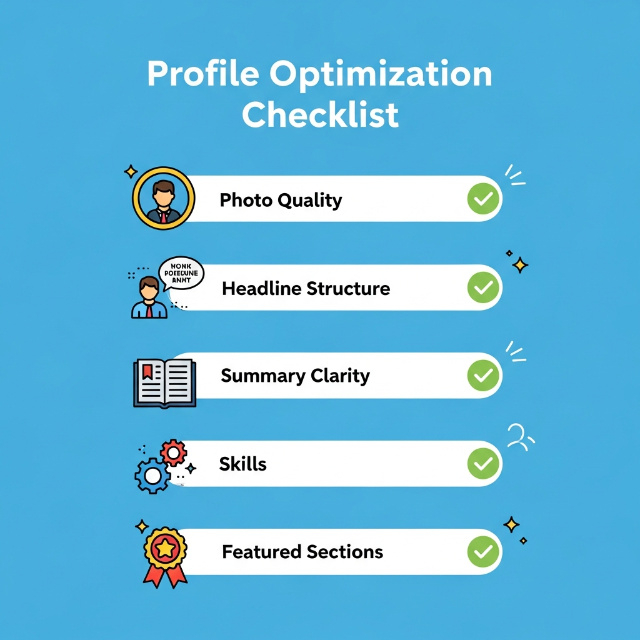
LinkedIn profile tips for college students center on professional photos, keyword rich headlines beyond generic titles, detailed experience descriptions with quantifiable achievements, 50 relevant skills strategically ordered, and consistent engagement with industry content. Students with optimized profiles receive 21 times more profile views and 36 times more recruiter messages than minimal profiles. Your LinkedIn profile is your 24/7 career representative; 87% of recruiters use it for candidate vetting, making optimization essential for modern job searches.
Key Takeaways:
- Use professional headshot and custom banner, profiles with photos get 21x more views
- Write keyword rich headline following [Major] | [Skills] | [Goal] | [University] formula
- Detail experiences with the Problem Action Result format, including quantified achievements
- Add 50 relevant skills and get strategic endorsements from connections
- Build 150+ connections and engage with industry content weekly for algorithm visibility
- Request 2-3 recommendations from professors and supervisors
Start optimizing your profile today, not when you start job hunting. Update your photo, rewrite your headline with keywords, expand your experience descriptions with metrics, and add skills from target job descriptions. Track your profile views over the next month compared to your current baseline. The increase in visibility will demonstrate that LinkedIn optimization is a high leverage investment in career success.
For students managing LinkedIn profile development while facing academic deadlines, the strategic use of a trusted essay writing service for specific assignments creates bandwidth for profile optimization, generating recruiter interest and long term career opportunities.
Transform your LinkedIn profile from a placeholder into a powerful professional branding tool that works for you continuously.